
To access the Confex Gateway you will be asked to log in using your AIChE website credentials, which are the same email and password you use to log in when registering for AIChE conferences or interacting with the AIChE website. If you do not have a login associated with AIChE, you will have an opportunity to create an account. Make sure that your email matches the one listed in Confex.
Link to the Gateway: https://aiche.confex.com/aiche/gateway.cgi
After logging in, locate the Meeting you are looking for on the general Gateway list to access the User Portal page.
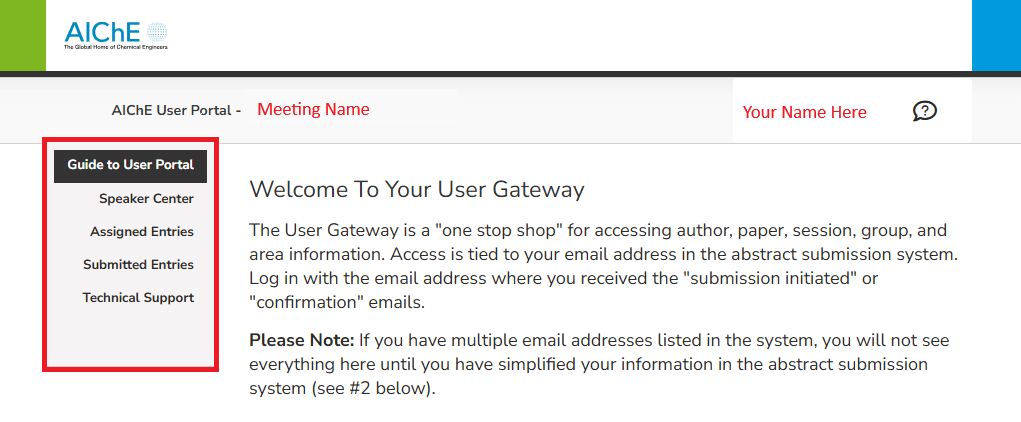
Once in the User Gateway for the specific meeting, you will see a panel on the left that includes Guide to User Portal, Speaker Center, Assigned Entries, Submitted Entries, and Technical Support. Depending on your role in the meeting, you may not see all these options in the left-side menu.
In the Assigned Entries tab, you will be able to view all entries to which you have been assigned a role, such as Presenting Author, Session Chair, or Group Chair. You can view or edit your entries in Confex by clicking on each entry title. Please note that only presenting authors of abstracts (not co-authors) have edit permission.

In the Submitted Entries tab, you will be able to view all entries to which you submitted, Sessions or Abstracts. You can view or edit your entries in Confex by clicking on each entry title. Please note that only presenting authors of abstracts (not co-authors) have abstract editing permission.
- Log in to post comments